Python Path Management: Tips for Handling Imports Efficiently: Part Two
In the first part of this series, we dove into Python path management. Specifically, how to handle imports by understanding absolute and relative paths and using sys.path to resolve import errors. In this follow-up, we'll explore pathlib and how it can simplify and enhance your path management in Python projects. Let's get started !
Pathlib Primer
Pathlib is a module in Python’s standard library that provides classes for working with filesystem paths in an object-oriented way, not as strings.
Fun Fact: Prior to Python 3.4, pathlib was not included in Python’s standard library, and needed to be installed from an external source like PyPI.
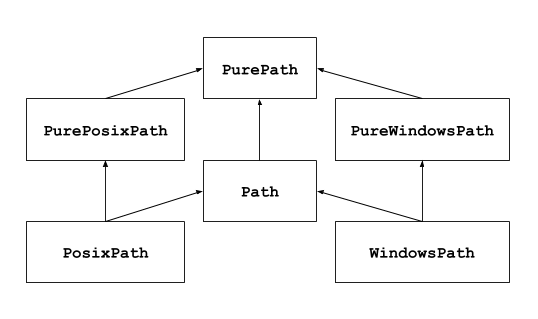
In pathlib, paths are represented by two main types: pure paths and concrete paths.
Pure Paths
Pure paths are purely computational representations of filesystem paths. They are used for manipulating path strings without any I/O operations. Pure paths can be instantiated with PurePath(). Depending on what OS you're on, instantiating it creates either a PurePosixPath or a PureWindowsPath
# Linux or Mac Host
>>> import pathlib
>>> pathlib.PurePath('test.txt')
PurePosixPath('test.txt')
# Widnows Host
>>> import pathlib
>>> pathlib.PurePath('test.txt')
PureWindowsPath('test.txt')Concrete Paths
Concrete paths , are subclasses of pure paths that represent actual filesystem paths.
Side-note: Though they’re called Concrete paths, python’s official documentation refers to them simply as Paths, so we’ll do the same going forward.
Paths provide all the functionality of pure paths(remember, subclasses 😉) addition to methods for interacting with the filesystem. This means concrete paths can perform I/O operations such as checking if a file exists, reading and writing files, and more.
Objects vs Strings
Pathlib’s object-oriented approach offers several advantages over the traditional method of handling file system paths as strings. Here are some:
Improved Readability and Maintainability
Paths represented as objects provide methods that are intuitive and self-explanatory. This makes the code easier to read and understand, reducing the likelihood of errors and simplifying maintenance.
String Approach:
import os

path = '/some/directory/file.txt'
parent = os.path.dirname(path)
new_path = os.path.join(parent, 'subdir', 'newfile.txt')
Object-Oriented Approach:
from pathlib import Path

path = Path('/some/directory/file.txt')
parent = path.parent
new_path = path / 'subdir' / 'newfile.txt'
In the object-oriented approach, operations like navigating to a parent directory or joining paths are more straightforward and expressive.
Cross-Platform Consistency
Let’s say you want your code to run across multiple platforms. Using the string approach, you’d do something like this:
String Approach:
import os
if os.name == 'nt':
    path = 'C:\\some\\directory\\file.txt'
else:
    path = '/some/directory/file.txt'
Object-Oriented Approach:
Remember, Path is a subclass of Pure Path giving it the ability to detect what OS you’re using.
from pathlib import Path
path = Path('/some/directory/file.txt')
With Pathlib, you don’t need to worry about these platform-specific differences; it abstracts them away.
Reduced Risk of Errors
Manipulating paths as strings can be error-prone, especially with complex path manipulations. Pathlib’s methods are designed to handle edge cases and errors more gracefully, reducing the risk of bugs.
String Approach:
import os

path = '/some/directory'
new_path = path + 'file.txt'  # Missing slash

if not os.path.exists(new_path):
    print(f"Path does not exist: {new_path}")
else:
    print(f"Path exists: {new_path}")

# Output
>>> Path does not exist: /some/directoryfile.txt
Object-Oriented Approach:
from pathlib import Path

path = Path('/some/directory')
new_path = path / 'file.txt'  # Proper joining

print(f"Joined Path: {new_path}")
if not new_path.exists():
    print(f"Path does not exist: {new_path}")
else:
    print(f"Path exists: {new_path}")

# Output
>>> Joined Path: /some/directory/file.txt
>>> Path does not exist: /some/directory/file.txt
Side-note: The above could totally be accomplished with os.join, but we're here to talk about Pathlib 😉Now that we have a high level overview of Pathlib, in addition to some of its benefits let’s jump into some more examples!

Pathlib in Action
For the following examples, we’ll be using this directory structure:
pathlib_primer
├── example.txt
├── script.py
└── subdir
Creating Paths
>>> from pathlib import Path
>>> path = Path('/Users/test_user/pathlib_primer')
>>> print(path)

# Output
/Users/test_user/pathlib_primer
Checking Existence
>>> if path.exists():
...     print("The path exists.")
... else:
...     print("The path does not exist.")
...
The path exists.
Iterating Over Directory Contents
>>> for file in path.iterdir():
...     print(file)
...

# Output
/Users/test_user/pathlib_primer/subdir
/Users/test_user/pathlib_primer/example.txt
/Users/test_user/pathlib_primer/script.py
Reading and Writing Files
>>> file_path = path / 'example.txt'
# Writing to the file
>>> file_path.write_text("Pathlib Primer!")
# Reading from the file
>>> content = file_path.read_text()
>>> print(content)

# Output
Pathlib Primer!
Joining Paths
>>> # Joining paths
>>> new_path = path / 'subdir' / 'file.txt'
>>> print(new_path)

# Output
/Users/test_user/pathlib_primer/subdir/file.txt
Retrieving Parent Directories
>>> print(path.parent)

# Output
/Users/test_user
Retreiving A Filename
>>> file = path / 'example.txt'
>>> print(file.name)

# Output
example.txt
Retrieving File Extension
>>> file = path / 'example.txt'
>>> print(file.suffix)

# Output
.txt
Pathlib offers an efficient, and intuitive approach to handling filesystem paths in Python. Its object-oriented design enhances readability and maintainability, ensuring that your code is clean and easy to understand. By abstracting away platform-specific differences, pathlib allows you to write code that works seamlessly across different operating systems. As demonstrated, transitioning from traditional string manipulations to pathlib not only simplifies path operations but also opens up a wide range of functionalities that can greatly benefit your projects. So, next time you find yourself wrestling with paths as if they were some kind of cryptic treasure map, think of pathlib is your trusty compass.

Thanks for reading! If you found this post helpful, please share it with someone who might benefit from it.

Xavier Alexander Newsletter
Join the newsletter to receive the latest updates in your inbox.