ping
Basic reachability and latency. Use ping to determine whether another system is reachable on your network or the Internet.
❯ ping google.com
PING google.com (142.251.41.174): 56 data bytes
64 bytes from 142.251.41.174: icmp_seq=0 ttl=119 time=13.802 ms
64 bytes from 142.251.41.174: icmp_seq=1 ttl=119 time=10.787 ms
64 bytes from 142.251.41.174: icmp_seq=2 ttl=119 time=11.562 ms
--- google.com ping statistics ---
3 packets transmitted, 3 packets received, 0.0% packet loss
round-trip min/avg/max/stddev = 8.294/10.828/13.802/1.624 ms
traceroute
Shows the network path packets take.
dig
The dig command queries DNS for information about domain names and their associated records, such as IP addresses, mail servers, and name servers. It is a valuable tool for diagnosing DNS issues and verifying DNS configurations.
The most important section is the ANSWER SECTION:
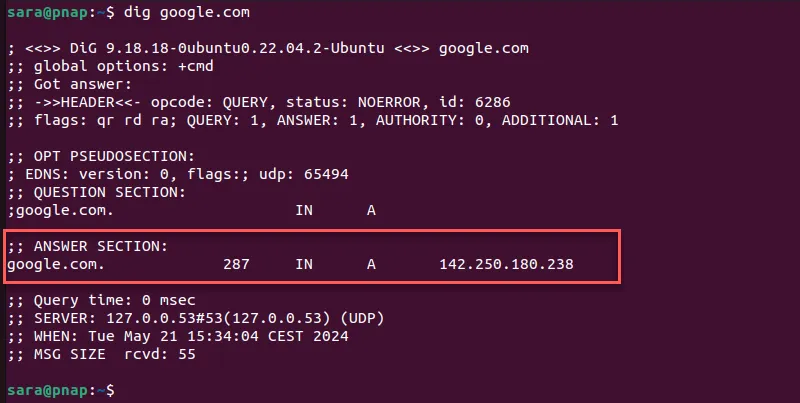
- The first column lists the name associated with the returned record.
- The second column is the Time to Live (TTL).
- The third column shows the query class. In this case,
INstands for Internet. - The fourth column displays the query type. In this case,
Astands for an A (address) record. - The final column displays the IP address associated with the domain name.
nslookup
Used for obtaining DNS records. Query an IP address with:
nslookup <IP>ss
The ss command is a simpler and faster alternative to the netstat command.
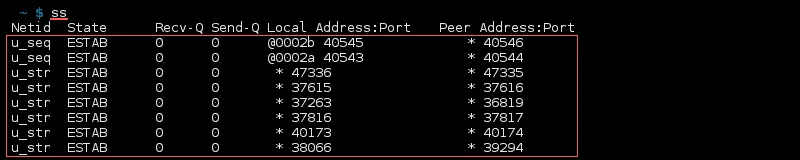
Common flags
| Command | Purpose |
|---|---|
ss -at |
List all TCP connections. |
ss -lt |
List all listening TCP sockets. |
ss -au |
List all UDP sockets. |
netstat
netstat shows connections coming to or going from the system, which can help with monitoring and troubleshooting. These notes use ss as its replacement on Linux.
lsof
lsof (LiSt Open Files) is a Linux command that shows open files and the processes accessing them. Every object in Linux, including devices and directories, is treated as a file. This is useful when investigating which process holds a file open.
curl
curl (short for Client URL) is a CLI tool that enables data transfer over various network protocols. It communicates with a web or application server by specifying a relevant URL and the data that needs to be sent or received.
When a URL is provided as an argument, curl outputs the remote content, such as HTML.
Common flags
| Flag | Purpose |
|---|---|
curl -O |
Download a file using its remote filename. |
curl -k |
Allow insecure TLS connections by skipping certificate verification. |
curl -i |
Include HTTP response headers in the output. |
wget
wget is a free GNU command-line utility used to download files. It retrieves files using HTTP, HTTPS, and FTP and is useful for downloads over unstable networks.
ifconfig
Retrieve information about network interfaces.
ip a
ip a (short for ip address or ip address show) displays IP addresses and network interfaces.
tcpdump
A network sniffer—also called a packet analyzer, protocol analyzer, or network traffic analyzer—can intercept and analyze network traffic that traverses a digital network. tcpdump is a command-line tool for this purpose.