DNS is the phonebook of the internet. DNS translates domain names to IP addresses
How Does It Work?
The process of DNS resolution involves converting a hostname (such as www.example.com) into a computer-friendly IP address (such as 192.168.1.1). An IP address is given to each device on the Internet, and that address is necessary to find the appropriate Internet device - like a street address is used to find a particular home.
How To Configure DNS (Not Really Preferred Method)
Use the /etc/hosts file.
cat >> /etc/hosts
192.168.1.11    db
How To Configure DNS (Preferred Method)
Use a DNS Server
Suppose your centralized DNS server is at IP address 192.168.1.100. You configure each host to use this server by editing the /etc/resolv.conf file. cat /etc/resolv.conf nameserver 192.168.1.100
Once configured, any hostname that is not found in /etc/hosts is resolved via the DNS server.
Domain Name Structure
-
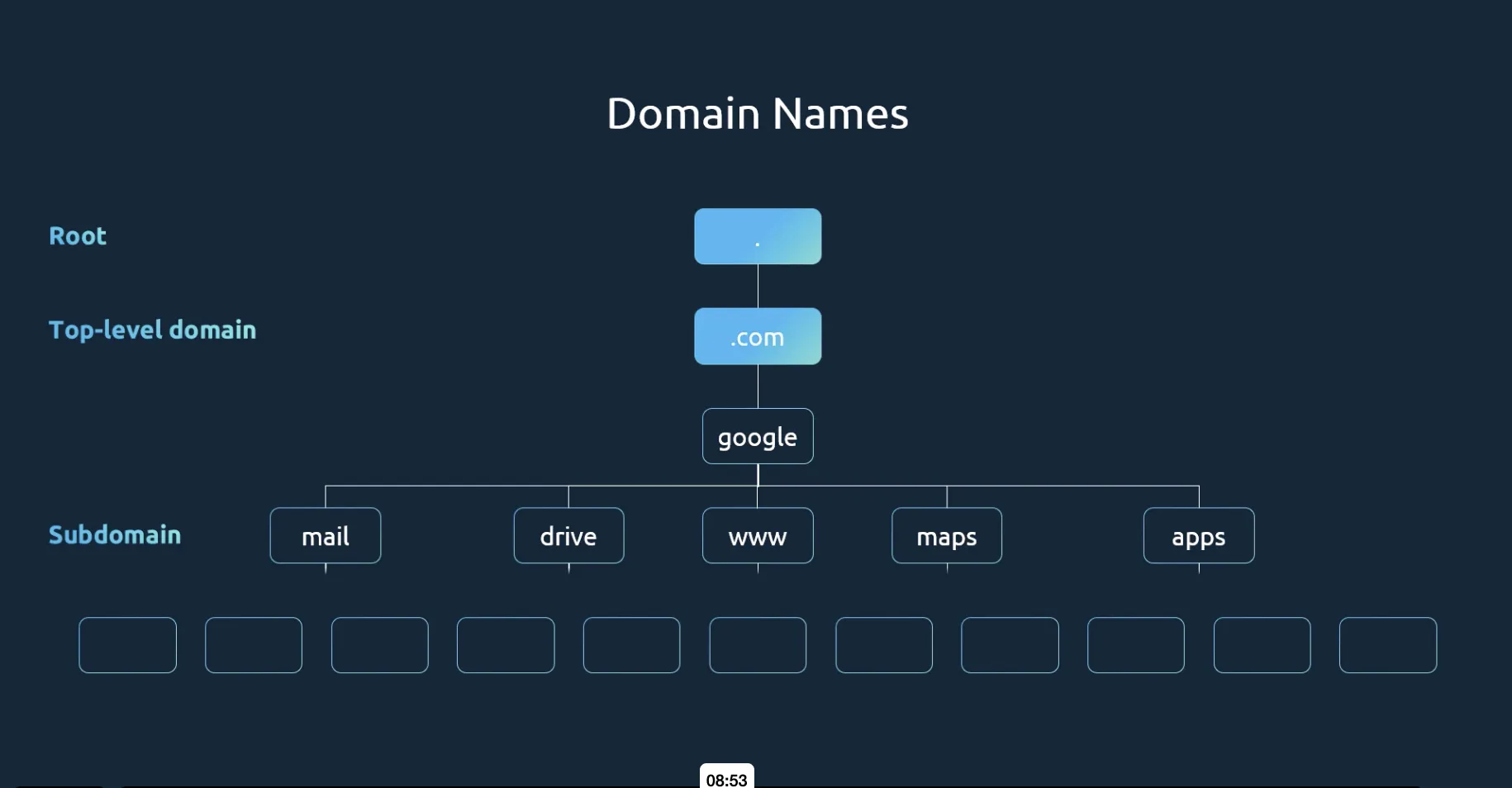
The top-level domain (TLD) appears at the end (e.g., .com, .net, .edu, .org).
-
The domain name precedes the TLD (e.g., facebook in www.facebook.com).
-
Any segment before the domain name is considered a subdomain (e.g., www).
- Subdomains allow organizations to separate services. Examples from Google include maps.google.com for maps, drive.google.com for storage, and mail.google.com for email.
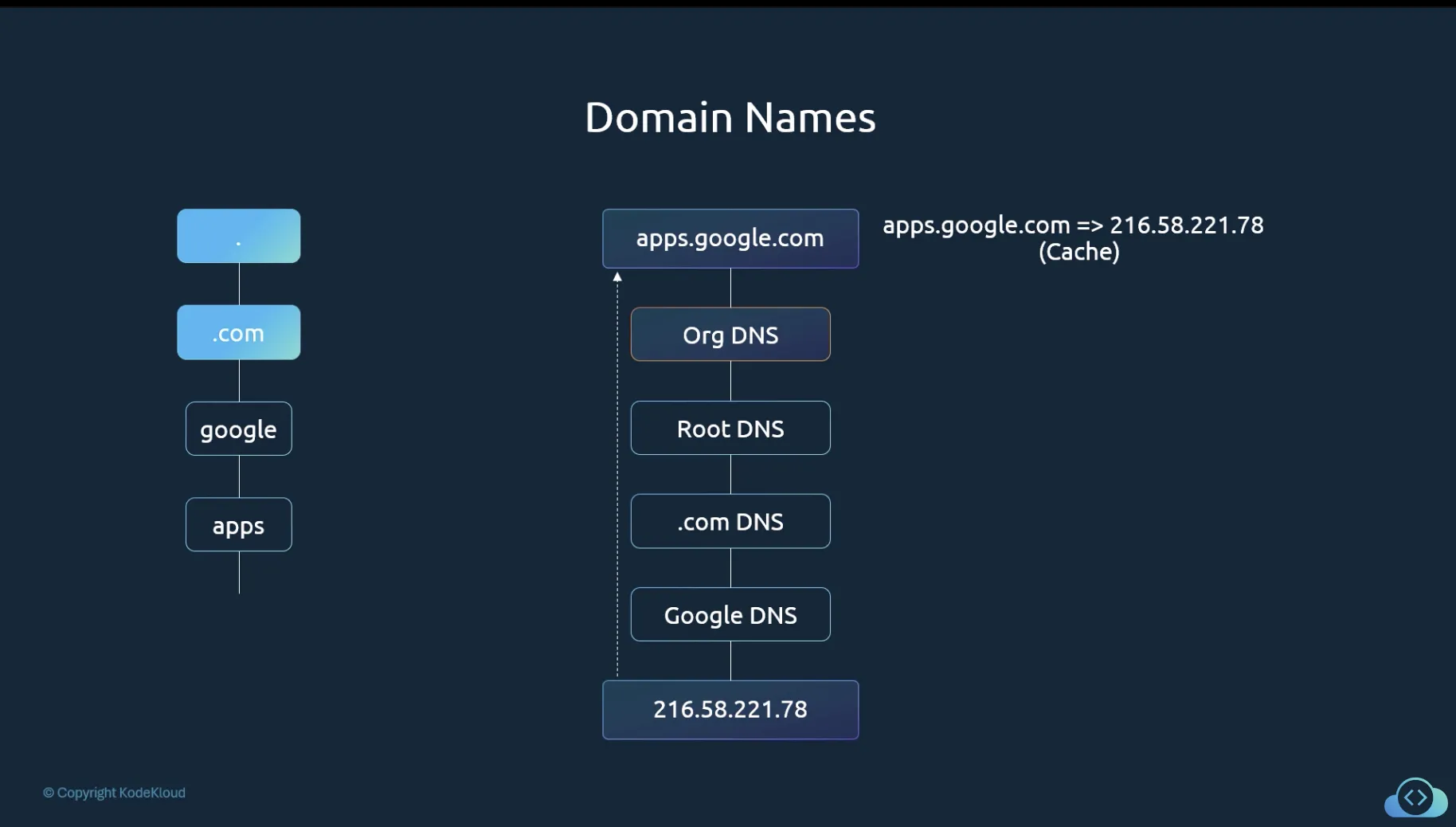
When your organization attempts to access a domain like apps.google.com, the internal DNS server first tries to resolve the name. Failing that, it forwards the request through a hierarchical process: a root DNS server directs it to a .com DNS server, which then points to Google’s DNS server. The IP address is returned and cached temporarily to expedite future queries.
DNS Record Types
| Record Type | Hostname | Address/Mapping |
|---|---|---|
| A | web-server | Maps hostname to an IPv4 address (e.g., 192.168.1.1) |
| AAAA | web-server | Maps hostname to an IPv6 address (e.g., 2001:0db8:85a3:0000:0000:8a2e:0370:7334) |
| CNAME | food.web-server | Aliases one hostname to another (e.g., aliasing to eat.web-server or hungry.web-server) |
Loading a Webpage
There are 4 DNS servers involved in loading a webpage
- DNS Recursor - This can be thought of as the librarian who is asked to find a particular book in the library.
- Root Nameserver - This is the FIRST step in translating human readble host names into IP addresses. This is like the index in the library that pooints to different racks of books
- TLD nameserver - The top level domain server (TLD) can be thought of as a specific rack of books in a library. This nameserver is the next step in the search for a specific IP address, and it hosts the last portion of a hostname (In example.com, the TLD server is “com”).
- Authoritative Nameserver - This final nameserver can be thought of as a dictionary on a rack of books, in which a specific name can be translated into its definition. The authoritative nameserver is the last stop in the nameserver query. If the authoritative name server has access to the requested record, it will return the IP address for the requested hostname back to the DNS Recursor (the librarian) that made the initial request.
What are the steps in a DNS lookup?
- A user types ‘example.com’ into a web browser and the query travels into the Internet and is received by a DNS recursive resolver.
- The resolver then queries a DNS root nameserver (.).
- The root server then responds to the resolver with the address of a Top Level Domain (TLD) DNS server (such as .com or .net), which stores the information for its domains. When searching for example.com, our request is pointed toward the .com TLD.
- The resolver then makes a request to the .com TLD.
- The TLD server then responds with the IP address of the domain’s nameserver, example.com.
- Lastly, the recursive resolver sends a query to the domain’s nameserver.
- The IP address for example.com is then returned to the resolver from the nameserver.
- The DNS resolver then responds to the web browser with the IP address of the domain requested initially.